Example onlyQuote Q-0001
Joe Bloggs Building Ltd
- Strip out and prepareFrom the business
- Start and finish datesFrom the business
- Insurance certificateSeen by BYP
- Company statusPublic record
Quote tool · Free with your profile
The Before You Pay quote tool takes you through each quote step by step: the work and prices, the dates, the payments and what’s included. Your customer gets a private link to read it and accept, and you both keep a dated record.

The quote

A price in a text message leaves a customer asking things you’ve already thought about. The quote tool puts the answers on the quote itself, in the same place every time, so they can say yes without chasing you for the detail.
| The customer asks | Where the quote answers it |
|---|---|
| When can you start? | The start and finish dates, or one date for a short job |
| How much is due up front? | Each payment stage, in pounds and as a share of the total |
| What’s included? | What’s included, and what isn’t |
| Who takes the rubbish away? | The waste: you, them, or none |
| How long does the price hold? | 14, 30, 60 or 90 days, your choice |
| Can I change my mind? | The cancellation information and form |
| Who am I dealing with? | Your details and what we’ve checked |
Example only Open it full size
How it works
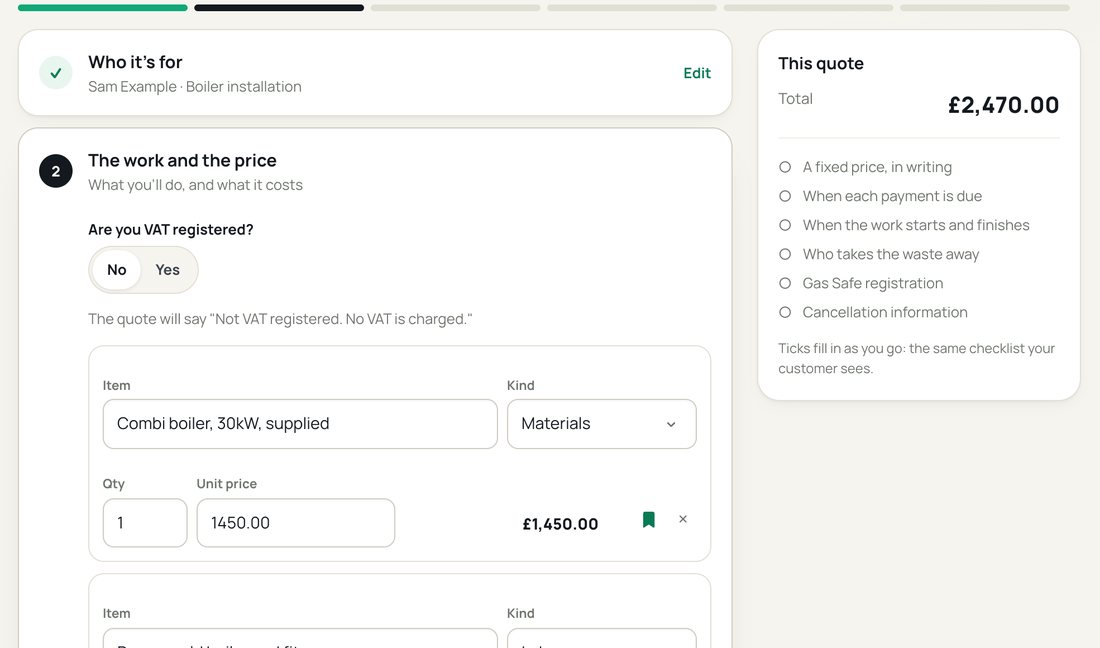
Each step opens when the one before is done, and folds to a line once it is. A small job needs a name, one line, a date and how it’s paid: about a minute.
The quote tool, step 2Example only
Your customer’s name, email and the job address. Your business details come from your profile, so you never type them again.
Lines for materials, labour and other costs, each with a quantity and a price. VAT on each line if you’re VAT registered.
A start and finish, or one date for a short job. Paid in full when it’s done, or in stages, with the balance worked out for you.
What’s in, what isn’t, the waste, how long the price holds, any paperwork for the job and your guarantee.
Your own terms and conditions, or none. The cancellation information and form are added to every quote for you.
See the quote exactly as your customer will, then send it as a private link or download the PDF.
What your customer gets
An email with a private link. No account to make and nothing to download.
The lines, the total, the dates, the payment stages and what’s included, laid out the same way every time. A PDF too.
Your business details and what we’ve checked about you, each with its label and date. Your profile QR code says Scan me.
The government’s model cancellation wording and form, word for word, with your details filled in. On every quote.
They type their name and tick to accept, or decline with a reason. You hear either way, and both of you get the accepted quote by email.
Accept this quote
I’ve read the quote and the terms
Both sides
A quote is the first thing you agree. When it’s complete and easy to read, there’s less to go back and forth on, before the job and after it.
For you
For your customer
After they say yes
An accepted quote turns into a project you both follow: each payment, the start, the finish and the paperwork, marked by one of you and confirmed by the other.
The quote is locked and dated, and both of you get a copy.
Your customer marks a payment as paid and you confirm it’s received. We never hold or move money.
The start and finish are steps you both follow. A date only moves when you both agree, with the reason recorded.
Send a change to the work with its price and any new finish date. Nothing changes until your customer accepts it.
At the end, your customer is asked once whether they’d like to share how it went, as a customer view on your profile.
Your quote, your price
We send the quote, show what we’ve checked about you and keep a dated record. We’re not part of the agreement and we don’t judge your price. A quote made here is read like any other on Check my quote: no better result for using our tool.
By trade

The same quote, written for the work you do: the jobs, the lines and the paperwork that go with them.
Questions
Yes. It comes with your free Before You Pay profile, with no limit on how many quotes you send. You can send quotes once we’ve checked your ID and address.
No. If you aren’t, there’s no VAT column and the quote says no VAT is charged. If you are, add your VAT number once in your dashboard and choose the rate on each line. We don’t decide which rate applies.
Yes. Paste them in or upload a PDF, or send the quote without separate terms. The agreed details always appear in full above them. We don’t supply terms.
So it’s never left off by mistake. The quote adds the government’s model cancellation wording and form, word for word, with your details filled in. We don’t write cancellation wording of our own.
No. The quote is from you to your customer, at your price. We send it, show what we’ve checked about you and keep a dated record of what was accepted.
For quotes sent from 17 November 2026, we may use the job type, the line descriptions and prices, and the town and month in price guides and our quote checking tools. We remove the customer’s details first, combine your prices with other businesses’ and never show your name with them. The terms say more.
Members (£5 a month) put their own logo on their quotes in place of ours, and their quotes don’t offer the customer a report on their business.
Claim your free profile. Once we’ve checked your ID and address, the quote tool is in your dashboard.